Clouds Time Lapse
I have captured the clouds moving across the sky using the timer set to take a photograph every 4 seconds. I left it doing this for about 1 hour and 30 minutes. The battery ran out half way through which is why it changes angle.
Tree Shadow Time Lapse
I sat underneath a tree in the arboretum with the camera set to take a photograph every 15 seconds. I left this for 1 hour and 30 minutes to capture the shadow move as the sun changes. I find this time lapse really interesting and is my favourite.

Thursday, 8 March 2012

Thursday, 1 March 2012
Projected Visuals more experiments
Star Time lapse test
I set the camera to a high exposure so it took 30 seconds to take each photograph in order to capture the stars. There was too much background light which is why its quite hard to see the stars but they are definitely moving. I set the timer to capture an image every 5 seconds after it took 30 seconds to take a photograph, I left it going for about 2 hours. This was my first time lapse experiment and I am going to try some other time lapses during the day time. The process is very time consuming and you have to be patient but sometimes the outcome is worth it.
Silhouette with gun experiment
I did some more work using the green screen, I filmed my friend walk to the center of the shot and turn holding out a gun and then walk towards the camera. I then used Premiere Pro to duplicate her and flip her the other way round, I also added copied it 2 more times so 4 of her walked towards the camera, turning the screen white. I played around with levels and the threshold effect to achieve the silhouette.
I captured a close up shot of her face as I used the fan to blow her hair, in the editing process I slowed this down, turned her into a silhouette and added some of my film footage within the silhouette. I used a close up shot of slow motion drips in a sink and a crack in the wall, I played around with levels to achieve an interesting, abstract style.
Original with repeat

Edit

I set the camera to a high exposure so it took 30 seconds to take each photograph in order to capture the stars. There was too much background light which is why its quite hard to see the stars but they are definitely moving. I set the timer to capture an image every 5 seconds after it took 30 seconds to take a photograph, I left it going for about 2 hours. This was my first time lapse experiment and I am going to try some other time lapses during the day time. The process is very time consuming and you have to be patient but sometimes the outcome is worth it.
Silhouette with gun experiment
I did some more work using the green screen, I filmed my friend walk to the center of the shot and turn holding out a gun and then walk towards the camera. I then used Premiere Pro to duplicate her and flip her the other way round, I also added copied it 2 more times so 4 of her walked towards the camera, turning the screen white. I played around with levels and the threshold effect to achieve the silhouette.
I captured a close up shot of her face as I used the fan to blow her hair, in the editing process I slowed this down, turned her into a silhouette and added some of my film footage within the silhouette. I used a close up shot of slow motion drips in a sink and a crack in the wall, I played around with levels to achieve an interesting, abstract style.
Original with repeat

Edit

Projected Visuals so far
Edit 1 (2 mins)
I have managed to solve the problem with the lines from the 7D by taking a still from the shot and use Premiere Pro to add a zoom and pan. I have added a silhouette handshake over the top of the figure with paintings within it, which I did simply playing around with levels and the threshold effect, which I have used to represent power and success. The paintings all show power such as the heavens, war and Moses who was in touch with god. I have created a still from an extreme close up of my dads eye and used the blending options to reveal a car wheel moving from the position of the iris which I think is abstract and interesting. I have cut together the green screen work I have done including the sunglasses which I did but editing a green colour over the top in Photoshop and have the film playing underneath as a different layer in Premiere Pro. I find this could be rather simple and not so exciting as it goes on for a long time so I could do something else to make it more interesting.
Original

Edit 1

Edit 2

Projected Visuals Edit 2 (2 mins)
I have added an abstract shot of a coin spinning in slow motion layered with a compass, I like the way I have positioned them to fit over the top of each other. I have been experimenting with the levels, colour and blending options on Premiere Pro and have been creating more abstract experiments layering film.
Compass and coin
Original

Edit

Original

Edit

Blending Options - Screen

I have managed to solve the problem with the lines from the 7D by taking a still from the shot and use Premiere Pro to add a zoom and pan. I have added a silhouette handshake over the top of the figure with paintings within it, which I did simply playing around with levels and the threshold effect, which I have used to represent power and success. The paintings all show power such as the heavens, war and Moses who was in touch with god. I have created a still from an extreme close up of my dads eye and used the blending options to reveal a car wheel moving from the position of the iris which I think is abstract and interesting. I have cut together the green screen work I have done including the sunglasses which I did but editing a green colour over the top in Photoshop and have the film playing underneath as a different layer in Premiere Pro. I find this could be rather simple and not so exciting as it goes on for a long time so I could do something else to make it more interesting.
Original

Edit 1

Edit 2

Projected Visuals Edit 2 (2 mins)
I have added an abstract shot of a coin spinning in slow motion layered with a compass, I like the way I have positioned them to fit over the top of each other. I have been experimenting with the levels, colour and blending options on Premiere Pro and have been creating more abstract experiments layering film.
Compass and coin
Original

Edit

Original

Edit

Blending Options - Screen

Monday, 27 February 2012
Projected Visuals Experiments
Layered film - City and footsteps
From what I have filmed of the Nottingham City I have put it into greyscale and layered shots of footsteps. I have experimented with the blending options on Premiere Pro to come up which an interesting effect. The dissapointing thing is that the Canon 7D has captured moving lines over the shots of the buildings.
Original images

Edit

Footsteps 2

Edit

Shirt and tie

Edit

Footsteps 3

Edit

Green Screen work - Silhouette and money
This is another experiment which I have created from editing photos of my friend in a suit using Photoshop, making him into a silhouette with only his sunglasses and shirt in colour. I have also put an image of him into black and white but created a red tie which I really like.
I took photos of him in front of the green screen so I could cut him out easily and layer him over the film. I dropped printed £50 notes I made in front of the green screen, cut each of them out and made them fall in slow motion behind the figure. This has taken a long time and I definitely want to use this.
Original

Edit


Edit

From what I have filmed of the Nottingham City I have put it into greyscale and layered shots of footsteps. I have experimented with the blending options on Premiere Pro to come up which an interesting effect. The dissapointing thing is that the Canon 7D has captured moving lines over the shots of the buildings.
Original images

Edit

Footsteps 2

Edit

Shirt and tie

Edit

Footsteps 3

Edit

Green Screen work - Silhouette and money
This is another experiment which I have created from editing photos of my friend in a suit using Photoshop, making him into a silhouette with only his sunglasses and shirt in colour. I have also put an image of him into black and white but created a red tie which I really like.
I took photos of him in front of the green screen so I could cut him out easily and layer him over the film. I dropped printed £50 notes I made in front of the green screen, cut each of them out and made them fall in slow motion behind the figure. This has taken a long time and I definitely want to use this.
Original

Edit

Original

Edit


Thursday, 26 January 2012
Projected Visuals - Artwork I could use and experiments
Artwork I could use for my video to represent power
Leonardo da Vinci, Battaglia di Anghiara

Michelangelo, Sistine Chapel

Michelangelo, Moses

I edited this image because the lines down the left hand side were too distracting and I wanted to change the levels to make the sculpture stand out more.

Silhouette with falling money background
I have looked at ways of doing this and found a solution that is quite simple. I found a video tutorial that showed me how to do the green screen technique. I will take a photo of someone in a suit, use Photoshop to edit the figure into a silhouette with coloured tie and sunglasses. Add the green colour to the background which I simply found online, import it into Premiere Pro, add my video of the money as the layer underneath and remove the green from the image.
This is the tutorial I found which was very helpful.
Test
I tested this out using images I found online to see if this works.
Green screen colour.

I added these silhouettes from the internet onto the colour using Photoshop.

This is the image I used as the background layer for this test.

Imported into Premiere Pro.

Used the 'Chroma Key' on Video effects to cut out the green.

John Hedgecoe
I liked this piece of work showing an image inside a silhouette as its like the precious moments of that person; their memories or what they are dreaming of. From this I thought of film playing within a silhouette such as lights.

Experimental video filming close ups of lights
I have taken photographs of my brother by the window, I have set a slower shutter speed and zoomed in and out whilst it was capturing the image to achieve this abstract look. I love the way the light has distorted the figure creating some interesting shapes.

Experiment with lights and silhouette
Experiment with lights and silhouette 2
Painting and sculpture in silhoutte idea
Proposal
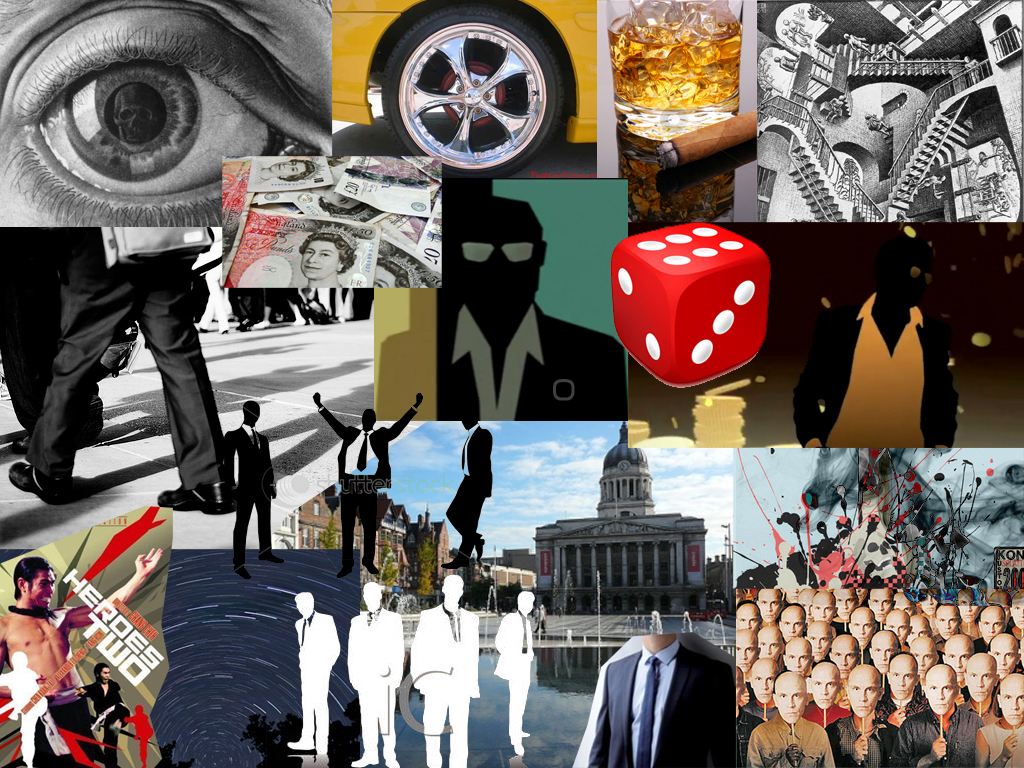
In this project I have gone for an abstract theme focusing on dreams, success, power and money. There are a range of different styles and techniques in my video such as green screen work, blending video layers, photography, time lapses and silhouettes. I focused on making something that is artistic and creative. Showing something that’s visually interesting and engaging. There is no clear narrative to my video and no clear characters. I wanted to make it seem like a series of abstract visuals in a dream that represent different things such as success, power and moving forwards in life. I wanted it to be different than what most rap videos are about and not showing anything about gang culture.
Monday, 23 January 2012
Projected Visuals project
Notes
Interesting visuals
No story or narrative
Possible multi-projections
Experimental
Jump cuts
Rap music - 14 tracks to choose from
3-6 minute tracks
Don't follow the track specifically
I have found this project really hard and its taken me a while to come up with ideas, the fact we can't really create something with any narrative makes it hard to plan. I thought this is a hard project for film and would be better as an animation but I am going to see what I can create with film. I have gone for a theme based on dreams, creating something abstract but relates to dreams of success and power. I want to include business and con-men as this relates to money which most of the songs are about.
Mind map

Moodboard
Rough ideas


Inspirational images:
Escher, Eye
I was inspired by this piece of work because I find it really powerful showing you what the person sees and how they feel. It's like the window to the soul, and from this I wanted to create an extreme close up of an eye and layer a car wheel over the iris. This piece of work shows death by the skull but if I show a wheel moving from the iris I am representing moving forwards and being successful.

Star Trails
I want to try and create a time lapse of the stars moving across the night sky and I was inspired a while ago when I saw a star trail image on BBC's 'Stargazing Live'. I have found a couple of star trail images online. I find the work facinating as it shows how the world is turning. The images remind me of the movement and power from the brushstrokes of Van Gogh's paintings.
Zoltán Bánfalvy

Andrew Stawarz

Inspirational videos:
Hustle - TV series opening credits
I love the animation for this and I want to use Photoshop to create a silhouette man in a suit similar to this. I thought the simplicity works well only showing the tie, shirt and sunglasses.
Time-lapse of night sky
I find this work incredible and I would love to create a time-lapse of the stars going across the night sky. I have been looking up how to do this on the internet and found tutorials which tell you how its done with a DSLR, like what settings it needs to be on. My brother has one of these and I will need his help to try and create this work, it involves taking photos all through the night.
Kanye West - Power
I like the style of a renaissance painting representing heaven and power. I would like to find a few paintings like this which I can layer some of my own film on to represent power.
Storyboards
Idea 1

Idea 2


Although this idea of layering the video will be quite hard I think it would look really interesting. I would just have to line the images up right to work with the shapes, colours etc and set one of the video's opacity down.
Idea 3

Subscribe to:
Posts (Atom)